
ForkCheck
A digital rental management system replacing paper forms with a structured mobile and desktop workflow.
Role
Product Designer
Platform
Mobile App, Desktop Dashboard
Focus
Rental Flow, Return Documentation, Fleet Management
01 Overview
ForkCheck is a product concept for managing forklift rentals in a small rental business that still relies on paper forms, WhatsApp photos, and manual tracking.
The system connects field documentation, rental status, return inspections, and office management into one structured workflow across mobile and desktop.
02 The Problem
The current rental process relied on handwritten forms, WhatsApp photos, and manual updates. Important details like engine hours, fuel level, damages, and return status could easily get lost or stay disconnected from billing and follow-up.
This created operational gaps: missed charges, unclear vehicle history, and no single source of truth for the office team.
This is the dashboard ForkCheck was designed to replace.


03 The Solution
I designed a digital workflow that separates field actions from office management: mobile forms for rental and return documentation, and a desktop dashboard for tracking fleet status, history, invoices, and follow-up tasks.
04 Process
Key UX decisions
The main UX challenge was deciding how to split the workflow between field workers and the office team. I focused on keeping mobile actions short and task-based, while using the desktop dashboard for tracking, history, documents, and operational overview.
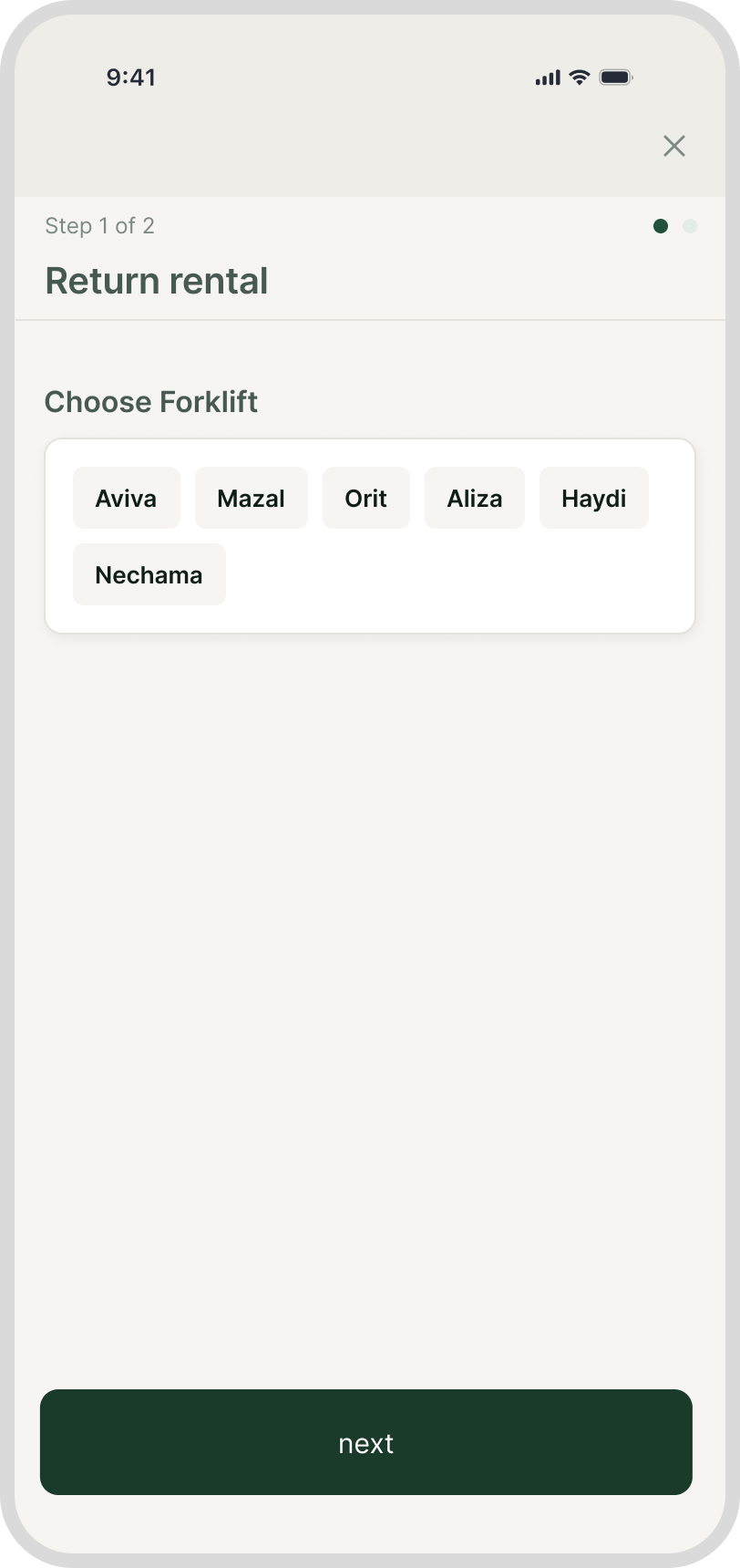
1. One flow for rental, one flow for return
I split the product between two work contexts: mobile for field documentation, and desktop for office management. This keeps photos, signatures, fuel level, and condition checks quick in the field, while fleet overview, history, documents, and billing support stay easier to manage from desktop.
Rent flow


Return flow

2. Mobile for documentation, desktop for management
I split the product between two work contexts: mobile for field documentation, and desktop for office management. Photos, signatures, fuel level, and condition checks happen during handover, while fleet overview, history, documents, and billing-related information are easier to manage from desktop.

3. Action-first entry point
The home screen starts with the worker’s immediate task: rent or return. After choosing an action, the user selects the relevant forklift and continues into a focused form that includes only the fields needed for that workflow.

05 Design System
To keep the product clear and consistent, I created a lightweight design system for the mobile app and desktop dashboard, including colors, typography, buttons, fields, cards, and status indicators.
Visual Direction
ForkCheck was designed for an existing Israeli forklift rental business with an existing logo and website. I used the current brand as a visual starting point, then adapted it for a digital product interface.
Color System
The color palette was designed to feel practical, calm, and easy to scan, using green as the main action color and neutral tones to support long forms and dashboard views.

Typography
The typography was kept simple and functional, with clear hierarchy between page titles, section labels, form fields, and dashboard data.

Buttons & Actions
The button system supports clear task hierarchy, with primary actions for rental and return flows and secondary actions for supporting steps.


Status Component
The status component helps make each forklift’s condition and availability clear at a glance, so the office team can quickly understand what needs attention.

Form Components
The form components were designed for quick field use, with clear labels, large touch areas, photo upload sections, and signature fields for rental and return documentation.

05 Mobile App
Field Worker Interface
The mobile flow was designed for workers in the field, focusing on two main actions: starting a rental and completing a return. Each flow uses short, task-based steps to document the forklift’s condition, hours, fuel level, photos, and signature.


06 Desktop Dashboard
Office Management
The desktop dashboard turns field data into a clear office management view, showing fleet status, open faults, pending invoices, and rental activity in one place.
From Figma to AI-assisted prototype
After designing the desktop dashboard in Figma, I used Claude Code to explore how the experience could work as an interactive prototype. This helped me test ideas for internal forklift pages, including rental history, maintenance, documents, and key operational actions.

By connecting field documentation with office management, ForkCheck turns a manual rental process into a clearer, more reliable operational workflow.
More Works
Insurance Cards

Dynamic Pages
